

Monday morning started like every other. Employees logged in. Phones were ringing. Orders were being processed. Customers were being helped.Then accounting lost access to its server.
It wasn’t caused by ransomware. It wasn’t a power outage. It wasn’t even a hardware defect. The server had simply reached the end of its lifecycle.
It had been running faithfully for years. It was out of warranty, the manufacturer no longer supported it, and replacement parts were becoming increasingly difficult to find. The warning signs had been there, but because everything still worked, replacing it always seemed like something that could wait.
Until it couldn’t. Within minutes, employees were unable to access files, leadership was approving emergency purchases, and IT was racing to restore operations.
The biggest problem wasn’t that the server failed. The biggest problem was that the business wasn’t prepared for it.
Technology doesn’t usually fail without warning. More often, it reaches the point where it has simply outlived its ability to reliably support the business.
What Is a Technology Lifecycle?
Every piece of technology your business relies on follows a predictable lifecycle.
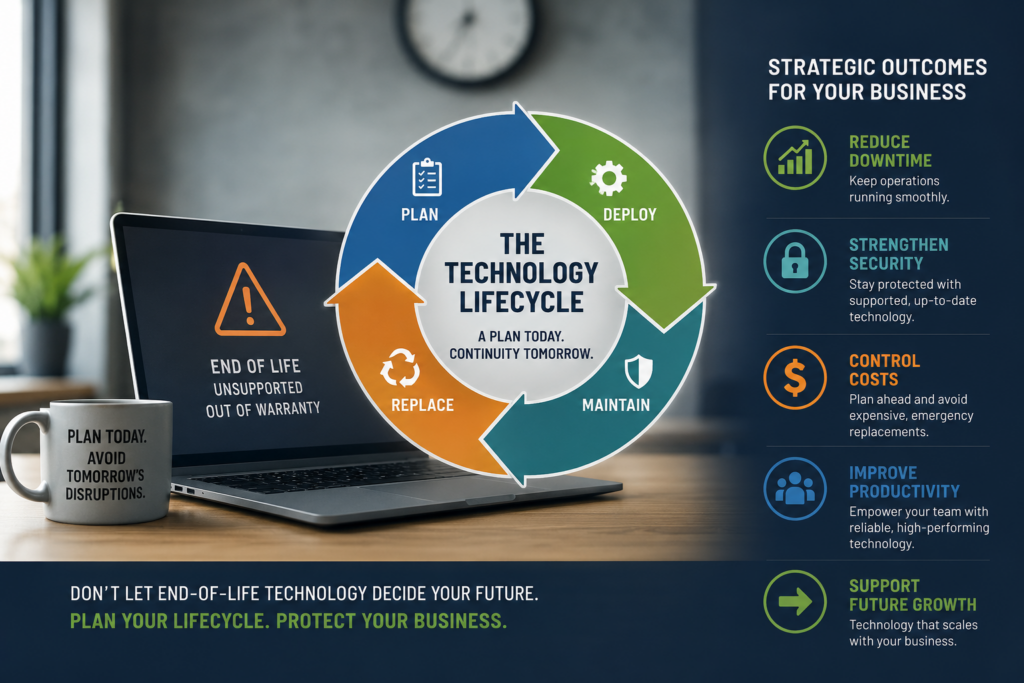
Whether it’s a laptop, server, firewall, wireless access point, or business software, every system moves through four key stages:
- Planning – Selecting technology that supports your business goals.
- Deployment – Installing, configuring, and integrating it into your daily operations.
- Maintenance – Monitoring performance, applying updates, replacing components, and protecting it from security risks.
- Replacement – Retiring technology before it becomes unreliable, unsupported, or a risk to the business.
The lifecycle isn’t about replacing equipment simply because it’s old.
It’s about ensuring your technology continues to support your business efficiently, securely, and reliably throughout its useful life.
Why It Matters
Many businesses don’t realize there’s a problem until something stops working.
Unfortunately, that’s often the most expensive time to discover it.
As technology ages, it can become slower, less reliable, and more vulnerable to security threats. Manufacturers eventually discontinue support, warranties expire, replacement parts become harder to find, and newer software may no longer be compatible.
The result isn’t just aging equipment—it’s increased business risk.
Without a lifecycle strategy, organizations often face:
- Unexpected downtime that interrupts operations
- Emergency replacement costs that weren’t budgeted
- Increased cybersecurity exposure from unsupported systems
- Reduced employee productivity caused by aging technology
- Difficult decisions made under pressure instead of through planning
Technology should enable your business—not become an obstacle to it.
The Business Takeaway
A technology lifecycle strategy isn’t about spending more money.
It’s about spending it at the right time.
When businesses understand what technology they own, how old it is, when warranties expire, and when systems should be refreshed, they can make informed decisions instead of reacting to emergencies.
The benefits extend far beyond IT:
- More predictable budgeting
- Fewer unexpected outages
- Stronger cybersecurity
- Better employee productivity
- Greater confidence that technology can support future business growth
Instead of asking, “What broke?” leadership can focus on “What’s next?”
That’s a much better conversation.
Don’t Wait Until Technology Makes the Decision for You
Eventually, every piece of technology reaches the end of its useful life.
The question isn’t whether it will happen—it’s whether your business will plan for it or be forced to react to it.
At CatchMark Technologies, we help organizations understand where their technology stands today and develop lifecycle strategies that align with their business goals. By planning ahead, businesses can reduce risk, avoid costly surprises, and keep technology working as a strategic asset instead of an operational challenge.
If you’d like to better understand the health of your technology environment and build a roadmap for the future, we’d love to start the conversation.
Check out our recent customer portfolio on the very same topic Lifecycle Management Case Study
Check out our social Facebook and LinkedIn and see what we are doing!